Custom Date Formats
Dates in reports normally follow your computer’s short date format, as defined in your Regional settings. However, Meeting Schedule Assistant also lets you fully customise how dates appear by using your own formatting codes.
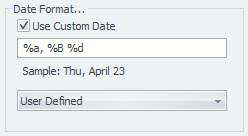
Figure 130. Use custom formatting for dates
Enabling Custom Dates
To use a custom date format:
- Enable Use Custom Date.
- Enter a format string in the edit box, or choose one of the 11 predefined formats from the dropdown.
- You can modify any predefined format. When you do, the dropdown automatically changes to User Defined.
Your format string can include special characters (format codes) that represent date parts. Any other characters you type will appear literally in the output.
Format Codes
Meeting Schedule Assistant supports two sets of date format codes. The set available depends on your language and version.
1. Standard Format Codes (All Languages)
These percent‑based codes are supported in every language.
|
Code |
Description |
|
%a |
Abbreviated day of the week |
|
%A |
Full day of the week |
|
%b |
Abbreviated month |
|
%B |
Full month name |
|
%d |
Day of month with leading zero (01–31) |
|
%m |
Month with leading zero (01–12) |
|
%y |
Last two digits of the year (00–99) |
|
%Y |
Full year (e.g., 2025) |
|
%#d, %#m, %#y |
Same as above but without leading zeros |
2. Extended Format Codes
Available from version 19.0.4 onward, these codes offer a more intuitive formatting style similar to other date‑formatting systems.
|
Code |
Description |
|
d |
Day of month (1–31) |
|
dd |
Day of month with leading zero (01–31) |
|
ddd |
Abbreviated day of the week |
|
dddd |
Full day of the week |
|
M |
Month (1–12) |
|
MM |
Month with leading zero (01–12) |
|
MMM |
Abbreviated month |
|
MMMM |
Full month name |
|
y |
Last digit of the year (0–9) |
|
yy |
Last two digits of the year (00–99) |
|
yyyy |
Full four‑digit year |
Exceptions — Languages That Must Use Standard % Codes Only
The extended format codes are not supported in the following languages. These languages must continue using the standard percent‑based codes:
Amharic, Arabic, Aukan, Cebuano, Chinese Simplified, Cibemba, Gun, Haitian Creole, Saramaccan, Sesotho (South Africa), Sranantongo.
Displaying Literal Text
To include literal characters (such as labels or symbols) in your date format:
- Wrap them in single quotes:
'like this' - To include a single quote in the output, use two single quotes:
'abc''bar' → abc'bar
Navigation
- Parent topic: General