
Calendar
The Calendar panel lets you choose the date range used when creating new schedules. You can view up to the next four months and select a range of up to 90 days. Special Events are shown when you hover over a date, making it easy to identify weeks that include assemblies, the Memorial, or other exceptions.
Selecting a Date Range
You can select a date range in several ways:
- Click the start date and drag to the end date
- Click the start date, then Shift‑click the end date
- Click the start date, hold Shift, and use the LEFT/RIGHT arrow keys to extend the range
Your chosen range is highlighted on the calendar.
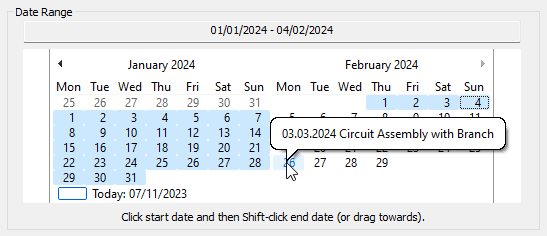
Figure 5. Selecting a date range on the calendar.
Special Events
If a date includes a Special Event, hovering your mouse over it will display the event details. This helps you avoid selecting a range that overlaps with assemblies or other special weeks unless you intend to.
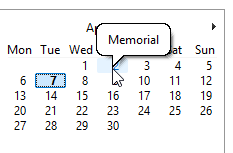
Figure 6. Viewing Special Event details by hovering over a date.
When a Date Range Is Required
A valid date range must be selected when creating a new schedule.
If no range is selected, the Create action will not proceed.
Navigation
- Parent topic: Using Meeting Schedule Assistant
- Previous topic: Toolbar
- Next topic: Meeting Schedules