
From NWS Desktop
This importer allows you to bring publisher information exported from NWS Desktop into Meeting Schedule Assistant. It is available from the Import menu.
Use this importer when you have a NWS Desktop CSV export containing publisher details and want to add new publishers to Meeting Schedule Assistant. Only new publishers are added; existing publishers are skipped.
What This Importer Does
The NWS Desktop Publisher importer reads a CSV file exported from NWS Desktop and imports:
- Publisher names
- Their gender
- Their roles (Elder, Ministerial Servant, Unbaptized Publisher, Regular Pioneer)
Only new publishers are added.
If a publisher already exists, they are skipped.
It does not modify existing speakers, congregations, assignment history, or meeting schedules.
Required Format
The CSV file must contain the following fields:
- DisplayName
- FirstName
- LastName
- Notes
- Gender
- GroupName
- GroupResponsibility
- Privilege
- PioneerStatus
- UseForChairman
- UseForAuxiliaryCounselor
- UseForPrayers
- UseForTreasuresTalk
- UseForTreasuresGems
- UseForTreasuresBR
- UseForApplyIC
- UseForApplyRV
- UseForApplyBS
- UseForApplyExplaining
- UseForApplyStudentTalk
- UseForApplyAssistant
- UseForLivingParts
- UseForCBS
- UseForCBSReader
These must match exactly as written in the CSV header.
Opening the Importer
From the Import Menu
Import → Publishers → From NWS Desktop
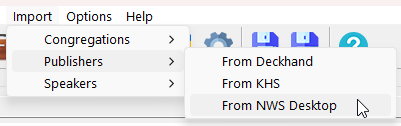
Figure 114. Selecting the NWS Desktop importer.
Import Steps
1. Select the NWS Desktop CSV file
Choose the CSV file exported from NWS Desktop.
The importer immediately reads the header row and validates the required columns.
2. Complete the import
A summary is displayed showing how many publishers were added or skipped.
Field Mappings
|
Field |
How it’s used in Meeting Schedule Assistant |
|
DisplayName |
The publisher’s display name. |
|
FirstName |
The publisher’s first name. |
|
LastName |
The publisher’s last name. |
|
Notes |
Notes imported from NWS Desktop. |
|
Gender |
The publisher’s gender. |
|
GroupName |
The field service group the publisher belongs to. |
|
GroupResponsibility |
The publisher’s responsibility within the group. |
|
Privilege |
Determines AppointedAs and baseline ServingAs. |
|
PioneerStatus |
Overrides ServingAs when applicable. |
|
UseForChairman |
Eligibility for Chairman assignments. |
|
UseForAuxiliaryCounselor |
Eligibility for Auxiliary Class Counsellor. |
|
UseForPrayers |
Eligibility for Prayer assignments. |
|
UseForTreasuresTalk |
Eligibility for Treasures talk. |
|
UseForTreasuresGems |
Eligibility for Gems. |
|
UseForTreasuresBR |
Eligibility for Bible Reading. |
|
UseForApplyIC |
Eligibility for Student Discussion. |
|
UseForApplyRV |
Eligibility for Student Discussion. |
|
UseForApplyBS |
Eligibility for Student Discussion. |
|
UseForApplyExplaining |
Eligibility for Student Discussion. |
|
UseForApplyStudentTalk |
Eligibility for Student Talk. |
|
UseForApplyAssistant |
Eligibility for Assistant roles. |
|
UseForLivingParts |
Eligibility for Living parts. |
|
UseForCBS |
Eligibility for CBS Conductor. |
|
UseForCBSReader |
Eligibility for CBS Reader. |
Privilege Mapping
The Privilege value determines both AppointedAs and the baseline ServingAs status used in Meeting Schedule Assistant. The following table shows how each Privilege code is interpreted.
|
Privilege |
Meaning |
AppointedAs |
ServingAs |
|
E |
Elder |
Elder |
Publisher |
|
MS |
Ministerial Servant |
MS |
Publisher |
|
PUB |
Publisher |
Not Appointed |
Publisher |
|
UBP |
Unbaptised Publisher |
Not Appointed |
Unbaptised Publisher |
|
No / blank |
None |
Not Appointed |
Other |
Pioneer Status Override
When applicable, PioneerStatus can override the ServingAs value. This override is only applied when the publisher is not an Unbaptised Publisher. The table below shows how PioneerStatus affects ServingAs.
|
PioneerStatus |
ServingAs |
|
RegularPioneer |
Regular Pioneer |
|
AuxiliaryPioneer |
Publisher |
|
Publisher |
Publisher |
|
blank / other |
no change |
Summary
The NWS Desktop Publisher importer provides a simple way to bring publisher information into Meeting Schedule Assistant. It supports:
- Importing publisher identity details
- Their gender
- Field service group assignment
- Privilege and pioneer status
- Assignment eligibility flags for meeting parts
Only new publishers are added.
Existing publishers are skipped.
After processing the file, a summary report shows how many publishers were added or skipped.
Back to Publisher Importers